If July had a theme, it'd be clarity: a clearer record of what you've bought, a clearer view of how you're invested, and a clearer sense of where your plans could take you. There’s a whole lot that’s new in Monarch this month…read on for more detail!
Forward a receipt, and we'll handle the rest
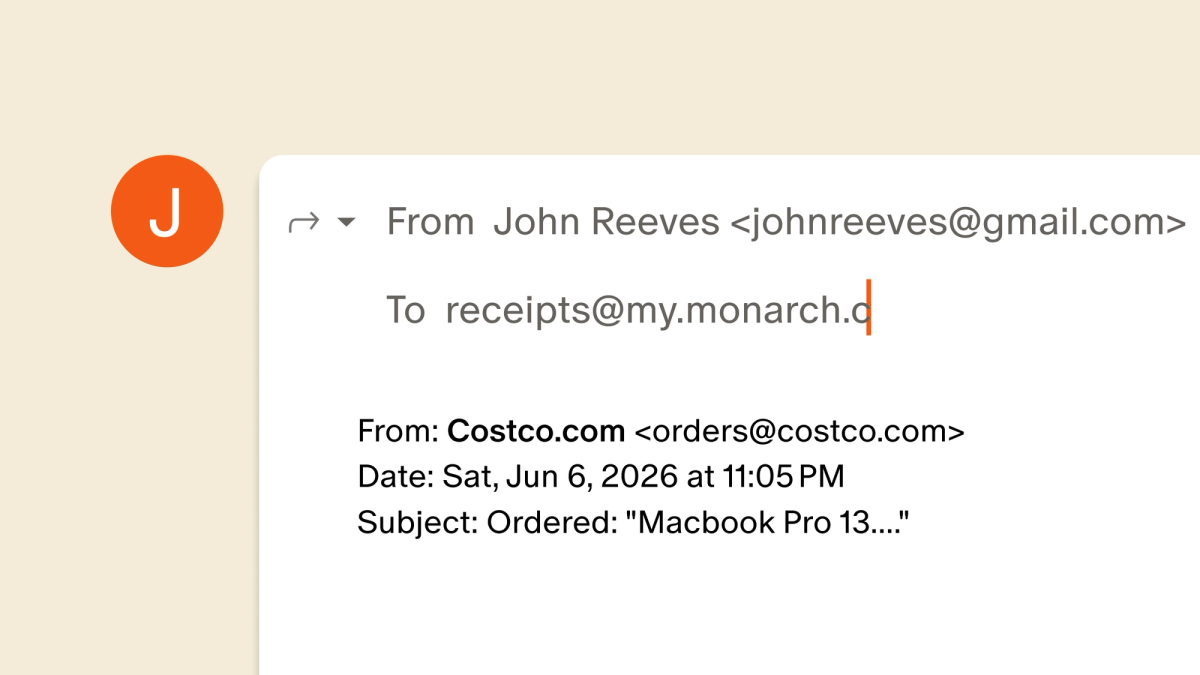
Your inbox is already full of receipts: that Costco.com order, the flight confirmation, the kids’ back-to-school items. You can now forward a receipt email straight to Monarch, and Monarch will automatically match it to the right transaction, add notes about what you bought, and split it into properly categorized transactions when it makes sense. All that detail now lives right on the transaction in Monarch, easy to reference whenever you need it.
Here's how to get started:
- Forward any emailed receipt or order confirmation to receipts@my.monarch.com. No special subject line or formatting needed.
- Your Monarch account email and household members' emails are already verified, so you can start right away. If forwarding from a different address, make sure to confirm it in your settings first.
- Receipts show up in your Receipts tab within a few minutes, indicating whether they’ve been matched or are pending a match.
- If a match is found, you’ll see the receipt attached to the original transaction, as well as any splits created and recategorized if you have this setting on.
See every change with the transaction activity log

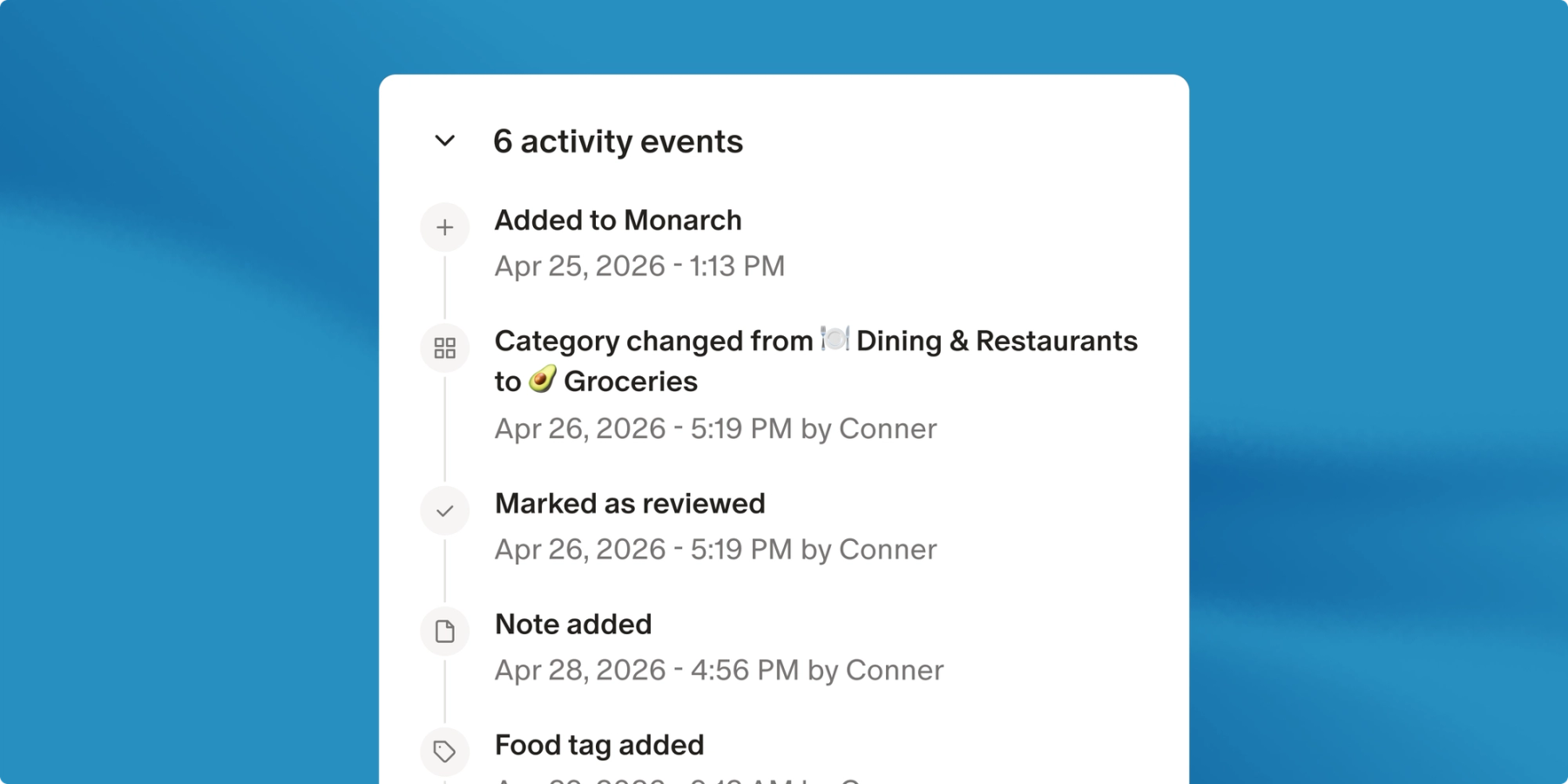
Every transaction has a history, and now you can see all of it. The new activity log gives any transaction a complete timeline: from when it first landed in Monarch, to the flip from pending to posted, to every category change and edit along the way. No more guessing what changed, or when.
Here's how to find it:
- Open any transaction on web and look for the new Activity section.
- It appears on any transaction with history to show, so make an edit and expand it to see the log in action.
- Available on web to start and coming to mobile soon.
We're initially rolling out with a basic set of activities, but will be adding more activity types very soon.
What's new in Monarch Plus
Monarch Plus is where you go deeper on your money. This month, that means a clearer picture of how you're invested and more powerful ways to plan ahead.
See your investments in a whole new light
The new portfolio treemap is the clearest visual of your diversification we've ever built. It breaks your portfolio into blocks by asset class and sector across all your accounts, and bigger blocks mean bigger positions, so your real allocation is clear at a glance. That's when you might catch something you hadn't before, like one sector quietly making up 40% of your holdings. Click any block to drill into the individual investments behind it, and if you'd classify a holding differently than we did, you can override it yourself.
See how you're allocated (on web)
Run different scenarios, see how they stack up
Big financial decisions rarely come down to a simple yes or no. Buy a house now, or keep renting and invest the difference? Retire early, or work a few more years and travel? Take the new job, or the steadier one? You've been building these scenarios in Forecasting, and now you can compare them on one chart.
Line up two plans and you'll see exactly how they diverge over time: projected net worth year by year, when major life events land, and how your retirement timelines compare. Now a decision that used to feel like a gut call becomes something you can see, side by side.
Explore Forecasting (on web)
Also new for Plus members:
- More accurate forecasts for mixed 401(k)s. If you have both pretax and Roth in a single retirement account, you can now forecast the two portions separately, balances and withdrawal order included.
- Growth rates that change over time. Your accounts no longer have to grow at one fixed rate forever. Set a rate that shifts across your plan, like a portfolio that starts aggressive and gets more conservative as retirement approaches.
- Business Tracking on mobile. Set up and manage Business Tracking right from your phone, with business context visible on your accounts and transactions. This was previously available on web only.
The new Goals experience is out of beta
In case you missed the news: we’ve rebuilt Goals from the ground up and its officially out of beta. It's designed around how you actually save, spend, and pay down debt, with investment growth rates, debt payoff, flexible spending, and more built in.
Updating to the new experience takes just a few clicks, and your goals will thank you for it! We're also hosting a live walkthrough of all that’s new, so register here to join and ask questions.
Update to the new Goals
Other big and small updates
- Smarter receipt management. A set of updates to the Receipts feature make it easier to view receipt details, edit splits, and manually match a receipt to a transaction when you need to.
- A dedicated home for retail sync. Your retail sync transactions now live in a tab inside Monarch instead of only in the extension, and you can link and unlink them with your Monarch transactions. Available on web only.
- Complete transaction backup. Hidden transactions, and transactions from hidden accounts, are now included in the full export from Settings, so your backup is actually complete.
- Re-import CSVs without duplicates. Edit a CSV, re-import it, and Monarch uses transaction IDs to update the existing entries instead of creating new ones. No more cleanup after an import.
- Downloads that respect your filters. Transaction downloads now match the filters on your visible view, so you get exactly what you're looking at.
- More accurate report totals. Stacked-bar total labels now stay in the right place, even when a period includes refunds or other negative amounts.
- New ownership grouping. A small but delightful one: you can now group by owner in the Spending and Income tabs.
- Make your profile color your own. Choose a custom avatar color that shows up consistently anywhere Monarch renders an owner.
As always, tell us what you want to see us build by voting on our product roadmap and stay tuned for more updates next month!