Every month, we ship things that make Monarch feel a little more like the app you've always wanted.
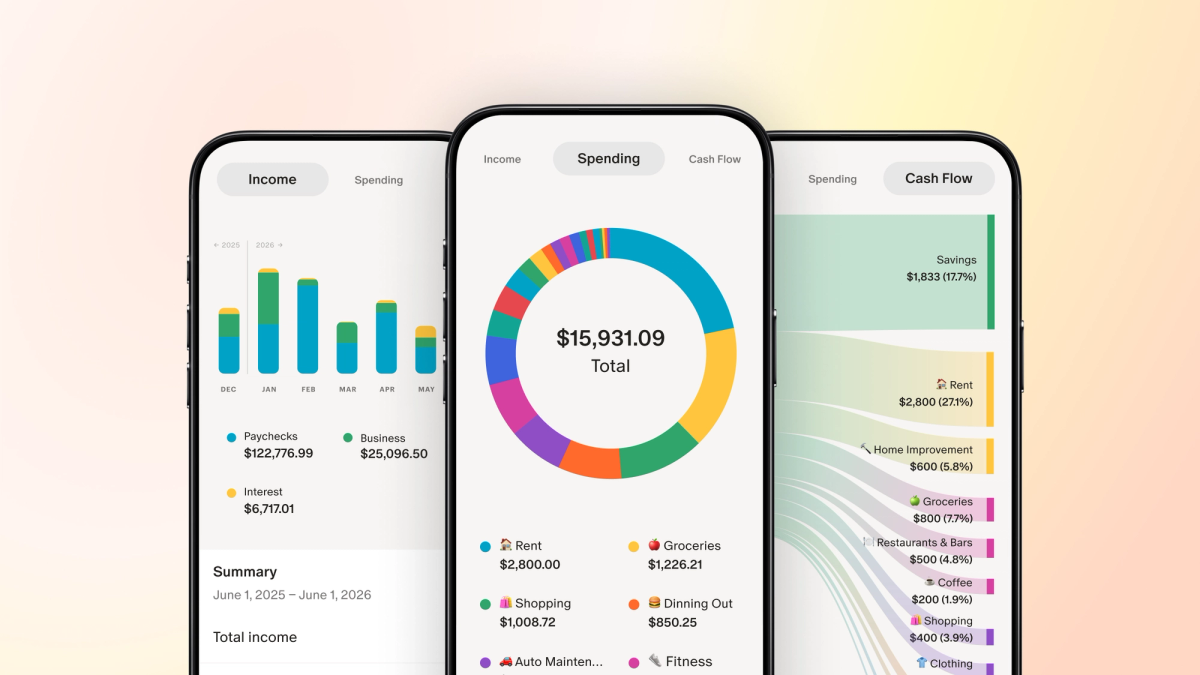
This month, reports are now on mobile, so the insights that used to live only on web are now with you wherever you are. Forecasting keeps getting more powerful, so you can explore more versions of your future. Goals has been completely reimagined and will be out of beta very soon. And a handful of smaller updates quietly made the everyday stuff like syncing accounts, and managing transactions a lot less friction. Here's what's new.
Your favorite reports, now on mobile
Access every report, anywhere you go. The reports you know and love from web are now easy to access anytime, including the fan-favorite Sankey cash flow view, spending breakdowns, and income summaries.
Everything you rely on to understand how money is moving through your life is now in your pocket.
View your reports on mobile
Goals, reimagined
We’ve fully reimagined our Goals feature from the ground up. The new experience transforms Goals from a basic tracker into something that actively helps you plan. Since launching in beta earlier this year, we've been shipping consistent updates to Goals, all based on your feedback. Here's what's new as of late:
- Transaction linking and automation via rules. You can now link transactions directly to goals, which was one of the most requested features since the new Goals experience launched. Automations can be set up using rules so you can set it and forget it.
- Investment growth rate support. A long-requested one: your goals now factor in investment growth rates, so brokerage and HYSA accounts reflect more realistic projections for save-up goals. Learn more
- All asset-type accounts can now link to goals. From digital assets like Coinbase to physical ones like vehicles and real estate.
- Debt pay down now connects to your budget. Your pay down plan can now be saved to your budget, giving you a more complete picture of your monthly plan including your planned contributions to debt and loan accounts.
- View and undo reconciliation history. You can now see a full log of your past goal reconciliations and undo any that don't look right, so fixing mistakes is quick and your balances stay accurate.
- Link transactions to goals in bulk. Select multiple transactions at once and link them to a goal in one go; a big time-saver when you're catching up on expenses like a recent vacation, home improvement project, and more.
These updates round out the new Goals experience we’ll be coming out of beta very soon. Now is a great time to upgrade if you haven’t yet!
Check in on your goals
Forecasting for multiple scenarios
Here's something we hear from members once they try Forecasting: once you can see your financial future, you start asking what else is possible. What if I move cities? Go part-time? Buy a vacation home?
Now, you can build out as many scenarios as you'd like. Each one is saved so you can revisit, adjust, and explore new possibilities whenever life changes.
Head to Forecasting on web to build out all your what-ifs today.
Other recent improvements
If you’ve started to build out a forecast, you know how many variables are in the mix. We’re adding to this feature weekly to give you more control, customization, and accuracy. Here's what's new.
- Real vs. future dollars. A new dropdown in the Assumptions Sidebar lets you choose between "Today's dollars (recommended)" and "Future dollars," so you can see what your projected numbers are actually worth.
- Custom event icons. Personalize your income and expense events with icons so your forecast is easier to scan at a glance.
- Custom intervals. Set custom intervals for income and expense events. For example, you can now model buying a new car every 6 years with a single event.
- Growth rate controls. Choose how your events grow over time: match inflation, set a custom increase or decrease, or hold flat.
- Windfall events. Now you can include a windfall in your forecast and see how this impacts your plans.
- Cash flow table drill-ins and withdrawals: Click into any cash flow row to see how the number is calculated, making it easier to understand and adjust assumptions if needed. You’ll now also see withdrawals on your cash flow table, making it easier to see exactly where your money is coming from, particularly in retirement.
- PMI support in Buy a Home. Private Mortgage Insurance (PMI) is now an option in the Buy a Home event, improving the accuracy of home purchase forecasting.
Explore Forecasting (on web)
Scan or upload receipts across both mobile and web
Receipt Scanning launched on mobile a few months back, and we're seeing some members upload hundreds (even thousands) of receipts. We've expanded the ways you can find it, use it, and get the most from it.
Here's what's new:
- Now available on web. Receipt Scanning was mobile-only at launch. You can now upload receipts directly from the Transactions tab in the web app.
- Bulk upload. Upload multiple receipts at once instead of one at a time to get all your receipts into Monarch with fewer steps.
- iOS and Android widgets and shortcuts. Add the new Receipt Scanning widget to your home screen for faster access on mobile. You can also long-tap the Monarch app icon or set up an iOS shortcut.
Coming soon: email forwarding
New to Receipt Scanning? Just upload a photo of a receipt and Monarch will automatically attach it to the right transaction, complete with detailed notes about what you purchased. Monarch can also split one transaction into multiple properly categorized ones — that Costco run that shows up as a single charge gets broken down into groceries, household supplies, and electronics automatically.
Try it on web
Refreshing your accounts just got an upgrade
If you've ever hit "Refresh All" and wondered what’s happening under the hood, this one's for you. We’ve redesigned this experience to give you more clarity on what’s happening and what’s been updated.
Head to your Accounts page, hit refresh, and here’s what you’ll see:
- Real-time progress when you refresh. Trigger a refresh on the Accounts page and you'll see a pop up that stays visible through to completion. No more wondering if it's still running.
- Per-account status detail. Tap "Show Details" to see each account move from in progress to completion, along with the number of transactions updated. For any account that didn't sync, you'll see more detail about why.
We hope you find this helpful. It’s just one of the many ways our aggregation team is making the foundational account connection experience better every day.
Other big and small updates
- Smarter rule creation defaults: When you create a rule after updating a merchant name, Monarch now defaults to the original statement so your rules apply correctly to future transactions. To make things even easier, the original statement is now autofilled.
- Faster merchant updates on web: When editing a transaction’s merchant, search results now replace the original statement as you type—so you can type and hit Enter to apply the top match without extra clicks.
- Forecasting navigation improvements: Expanded rows in forecasted tables now persist across tabs, so you don't lose your place as you navigate.
- Shift+click range select transactions: Quickly select or unselect a range of transactions for bulk editing. First click “edit multiple,” then shift and select the specific transactions you want to edit.
- Custom columns visibility: You can now hide or unhide columns in your transactions menu on the web. We know this has been a long-standing request for more flexibility and we hope to add more options here for customization soon.
- Account filters upgrade: We added the ability to filter the entire Accounts page by multiple account types, by individual accounts, and by owners to reflect in net worth charts and the summary section. Previously, you could only do this by one account type at a time. This update is available on desktop (web) only.
- Goals design improvements: Contribution hover amounts now stay visible and accounts with a $0 allocation are hidden from the summary card. We also resolved a few bugs around goals incorrectly showing as completed.
- Quick actions menu on web: You can now right-click (or use the dots menu) on any transaction row to quickly access and add tags without opening the full transaction drawer.
As always, tell us what you want to see us build by voting on our product roadmap and stay tuned for more updates next month!