
As of July 2025, Americans have over $2 trillion sitting in forgotten 401(k) accounts, with an average balance of $66,691 per account according to Department of Labor data. While your 401(k) money belongs to you no matter where you go, forgetting about it means you’re not optimizing how your retirement savings grow.
With many of these accounts lost in the gap of a job transition, it’s crucial that you keep track of retirement funds as you make the switch to a new account — and take advantage of the transition to get the most of your savings. This guide walks you through what happens to your funds when you change jobs, if and how you should move your funds, and how you can make your job transition a financial success.
Key takeaways
- While you can keep your 401(k) funds after you transition jobs, unvested funds may be forfeited if you cash out or roll over the balance before the vesting period.
- You can choose to roll over your 401(k) funds to a new 401(k) or IRA, or keep the balance in your old account. Cashing out comes with penalties unless you meet certain requirements.
- When transitioning out of an old job, make sure to manage your finances, get your insurance and COBRA in order, clear out any FSAs, and ensure that your new retirement accounts are set to the contribution rate you want.
What happens to your 401(k) when you leave a job
In a nutshell: Your 401(k) is yours and pretty much stays where it was before you left — in a trust account with the financial holder your former employer entrusted it to. While you can no longer make contributions, you can still manage your investments and watch your money grow, though you may be charged a fee through the holding company.
From there, you have a few options. Before you decide to do anything, however, it’s crucial that you check the vesting schedule. Vesting is how much of your retirement funds you fully own. If your employer had a 401(k) match or a stock investment plan, any employer contributions may not be fully vested. Instead, you’ll have to wait for a certain period of time for your stock to vest before you can fully withdraw it or roll it over, or else lose your employer contributions.
Another thing to keep in mind is SECURE 2.0 force-out rules, which allow your employer to “force out” and move your balance if it is under $7,000.
- Balances under $1,000 can be distributed as a lump-sum payment subject to taxes and early withdrawal penalties.
- Balances between $1,000 and $7,000 must be rolled over to an individual retirement account (IRA) with a qualified custodian.
- Balances over $7,000 can stay in the account until you choose to move it or withdraw it.
What your options are for your old 401(k)
After you’ve reviewed your vesting and force-out rules, it’s time to decide what to do with your old 401(k) balance. You have four main options available to you: Leave it with your old employer, roll it over to a new 401(k), roll it over to an IRA, or cash it out.
Here’s a quick comparison of the four options.
Tax treatment | Penalties | Best for | |
Leave it | Tax-free until distributed | No penalties, though may incur fee with holding company | Old plans with low or no management fees, or with a loan balance |
Roll over to 401(k) | Tax-free until distributed | No penalties | New plans with better management fees or more vesting options |
Roll over to IRA | Can be taxed if rolling over to Roth IRA | No penalties if indirectly rolled over within the 60-day timeframe or directly rolled over | Total control over investments independent of employer or employment status |
Cash out | Subject to federal and local taxes | Can incur up to a 10% early withdrawal penalty | Individuals over age 55 |
Here are the options in more detail.
Option 1: Leaving a 401(k) with your employer
Leaving your balance with your employer’s holding company is the simplest course, and requires no further action on your part. This can work well for you if you’re above the $7,000 force-out maximum, have good investment options and growth, or if you have taken out a loan against your plan and are able to make direct payments on your balance.
On the downside, keeping track of multiple old 401(k)s can become complicated, especially if you don’t have a way to track their progress from one place.
Option 2: Rolling over to your new employer's 401(k)
Rolling over your balance to a new 401(k) can be a good option if your new employer has better investment options and lower fees, and if you want to consolidate your retirement funds. This method doesn’t have any upfront fees, taxes, or penalties, though you may be charged fees for your new 401(k) plan depending on the holders.
Keep in mind that if you have a loan against your old plan, you may be taxed for the remaining amount borrowed if your current balance is used to pay it out.
Option 3: Rolling your 401(k) over to an IRA
Rolling over your 401(k) to an IRA can be a good option if your old 401(k) plan has high fees and poor growth, if your new employer doesn’t offer a 401(k), and/or you don’t intend on getting a full-time job for the foreseeable future.
IRAs offer more options and control than a 401(k) in terms of investment. Because they’re individually owned, you control the funds at all times regardless of employment status or location. While IRAs do come with yearly contribution limits, rollovers do not contribute to that limit.
When rolling your funds over to an IRA, you have a few options in terms of how and where you’re moving it.
IRA rollovers can be direct or indirect. Direct rollovers require you have an IRA set up, either within the same institution managing your 401(k) or a new institution. You then contact your plan’s current manager and request a rollover, providing the information of your new account and custodian, which the old custodian will then initiate a transfer to. This process can take up to a month, though it is completely tax and penalty free.
An indirect rollover is when you cash out your 401(k) balance with the intent of depositing the balance into an IRA. You’ll have to withhold 20% of your balance for tax purposes, which will be refunded with your next tax return, and that you must then deposit again, or else have it treated as a taxable distribution. You will also have to deposit your balance within a 60 day period or else lose your tax deposit and be subject to early withdrawal fees, and can only initiate one indirect rollover every 12 months.
The other option to consider is whether you want to transfer your balance to a traditional or Roth IRA. While a traditional IRA can receive your 401(k) balance with no taxes, because a Roth IRA relies on post-tax income, you will be required to pay the income taxes for a Roth IRA rollover.
Option 4: Cashing out your 401(k)
Cashing out your old 401(k) balance isn’t the best option. Not only does it incur tax and early withdrawal penalties, but if you’re early in your retirement journey, you’ll miss out on compounding returns on your investments, which can have big financial consequences when it comes time to retire. Only cash out on your balance if you are close to retirement and can use the Rule of 55 to cash out penalty free (more on that later.)
There are a few other ways to cash out and avoid the penalties, though you will still be required to pay income tax on your distribution, and will miss out on compounding investments. These exemptions include:
- Birth or adoption
- Domestic abuse
- Domestic relations
- Federally declared disasters
- Medical expenses
- Military duty
- Personal or family emergencies
- Terminal illness
The real cost of cashing out
Cashing out early can come with real financial consequences. Let’s say you have, at 35 years old, a $30,000 balance you choose to cash out. If you’re at the 22% federal tax bracket and pay 8% in state taxes, here’s how much you’ll end up losing out on:
Rate | Total | |
Federal taxes | 22% | $6,600 |
State taxes | 8% | $2,400 |
Penalties | 10% | $3,000 |
TOTAL | $12,000 | |
FINAL BALANCE | $18,000 |
Not only will you be left with only 60% of your 401(k) balance, you’ll lose far more in potential growth. If you had left your 401(k) balance in your old account, or rolled it over into an IRA or new 401(k), at 7% compounding growth, you could have had $228,367 in your account by the time you retired at 65. In the end, you don’t only pay $12,000 in taxes and penalties — over the long run, you end up losing nearly $200k in potential returns for only $18k today.
The rule of 55: An exception worth knowing
One core exemption to cashing out early is what’s known as the Rule of 55, which allows individuals who leave their job in or after the year they turn 55 to cash out their 401(k) penalty-free. While taxes do still apply, the IRS treats a Rule of 55 cash-out as a standard retirement withdrawal and does not apply the 10% penalty.
In order to qualify for a Rule of 55 cashout, you must:
- Leave your job (voluntarily or involuntarily) in or after the calendar year you turn 55.
- Be cashing out the 401(k) of the employer which you are leaving (old accounts do not apply).
- Be cashing out a 401(k) (IRAs do not count.)
The Rule of 55 can be useful if you plan on retiring early, are moving to a part-time job, or if you would rather have the cash from your old 401(k) and not have to worry about rolling it over. While you will be losing out on compounding growth, since it’s closer to your retirement year, the impacts aren’t as heavy as cashing out earlier in your career. Be sure to consult with a financial advisor or planner when considering whether to cash out on your 401(k).
How to execute the rollover: Step by step
Rolling over your 401(k) balance takes a few steps. Here’s the breakdown so you don’t miss any details.
Step 1: Check your vesting schedule and confirm your balance
Before initiating a rollover, be sure to check your vesting schedule and make sure that 100% of your balance will be rolled over to your new account. As well, be sure to confirm and take note of the balance so you can double-check when you complete your rollover.
Step 2: Decide where you're rolling over
Figure out where you want your balance to land, as your old plan administrator will need the information when initiating the rollover. If you’re rolling over to an IRA, you may want to consider opening an account with your 401(k) holding company if you found the service and growth to be good, which can speed up the process.
Step 3: Open the new account if needed
If you’re transferring your balance to an IRA, open your new account with a provider now. This can usually be done for free, and requires a few basic details such as your contact information.
Step 4: Request a direct rollover from your old plan administrator
Once you’re ready, you can formally request a rollover from your old plan administrator. You’ll need to provide information about your new provider, as well as whether your rollover will be direct (which transfers your funds directly) or indirect (which involves cutting you a check and having you transfer the funds yourself).
Even if it seems simpler, don't accept a check or a cash out option. Always request a direct rollover to avoid mandatory 20% withholding and the 60-day clock. Waiting four weeks for your balance to transfer is always better than losing your balance to taxes and the penalty fee.
Step 5: Confirm the transfer
Usually the transfer will be initiated electronically through a wire transfer, which doesn’t require any work on your part. Some holding companies, however, may send you a check in the new holding company’s name, which you will have to then mail to your new custodian. If this is the case, be sure to send the check by certified mail.
Once the transfer is complete, check the balance of your new account and confirm that 100% of your 401(k) has been deposited.
Step 6: Update contribution rate at your new employer
Finally, once your balance is set and you’re settled in with your new plan, take the time to read through your employer’s contribution matching rate and vesting terms, and set your new contribution rate.
The contribution rate reset trap
When rolling over your new balance, don’t just set it and forget it. Often, your new employer will put you on the default auto-enrollment rate, which can get you left behind on contributions and maxing out on the employer match rate. Even if your salary gets a bump, contributing at a lower rate than before will cost you more in terms of missed growth and money left on the table.
Instead, update your contribution rate as soon as you’re enrolled (Monarch recommends, at minimum, matching your employer’s contribution maximum) and make sure your contribution from your paycheck aligns with your preferred rate.
What to do if you find an old 401(k)
The average American has changed jobs nearly 13 times in their career, according to the Bureau of Labor Statistics, with younger generations switching jobs more often. As a result, many Americans have old retirement accounts they’ve long forgotten, to the tune of $2.1 trillion across 31.9 million forgotten accounts.
Don’t let your account become one of them. To start, use the Department of Labor’s Retirement Savings Lost and Found database at lostandfound.dol.gov and create an ID-verified account. From there, you can start tracking down old accounts in your name that are linked to your Social Security Number (SSN).
Alternatively, you can contact your former employer’s HR department or your former plan administrator and see if there are any plans matching your SSN.
If neither of these methods work, try using your state’s lost or unclaimed property registry, which lists unclaimed funds, inheritances, estates, and retirement accounts that are eligible for reclaiming with proper verification.
Once you’ve found an account, contact the plan’s current administrator or custodian to verify your details. While most administrators have a hotline or email on their website, if you’re having trouble getting in touch, you can find your administrator’s contact info through the Department of Labor at www.efast.dol.gov. From there, you can initiate a rollover or cash out of your funds.
Beyond the 401(k): Your full job change financial checklist
Besides your 401(k), when switching or leaving an old job, there are a few key financial moves you should make so that your transition is a smooth one.
COBRA
Consolidated Omnibus Budget Reconciliation Act (COBRA) coverage allows you to keep your health insurance plan for up to 18 months after your employment ends, provided that you continue paying the premium. You have 60 days to elect for COBRA, with backdated coverage up to day 1 if you had any insurance-covered expenses accrued during the processing period.
Since your employer will no longer be contributing toward your premium (though some do offer to do so as part of a severance package), your premium will likely be higher. You will also have to pay for it directly from your COBRA provider, as it will no longer be deducted from your paycheck.
Severance
If you were laid off, you may qualify for severance from your old job. If so, be sure to read through the severance agreement and the conditions entailed in it. Some severance agreements, for example, require that you waive your rights to sue the company for discrimination, or have a non-disparagement clause that prevents you from speaking badly of the company in public.
On top of your severance conditions, consider what you’ll do with the money afterwards. You may choose to put it toward your emergency fund, have it cover the gap between your employment periods, or use it to pay down debt.
HSA
Health Savings Accounts (HSAs) are fully portable and roll over from year to year, which is one of their key advantages. You can continue to contribute to an HSA if you are on a high deductible health plan (HDHP) through COBRA, though you will need to make these contributions directly to your COBRA provider. From there, you can roll your funds over into an individual HSA.
Flexible spending accounts (FSA)
Flexible spending accounts, unlike an HSA, are use or lose. While the grace period typically extends a few months into the following year, using up your funds as soon as possible will help you avoid snags in filing for dispersals and prevent last-minute scrambles.
Life insurance/disability
While it’s common that your employer offers life insurance and disability coverage, it’s not always the default. While you should already have a life insurance policy on top of the standard one your employer offers, if needed, consider upping your coverage or buying an individual plan if your new employer doesn’t offer one.
New employer benefits enrollment
When HR sends you your benefits packet, don’t just skim it. Make sure you understand what benefits are offered, what your 401(k) match is, how much you can elect to contribute toward your FSAs, what insurance options you’ll be offered, and how much your premiums and deductibles will be.
If you have a spouse whose benefits plan you would like to be added to, now is the time to file a request, as changing jobs is considered a qualifying life event.
Emergency fund
If possible, before leaving, make sure your emergency fund is up-to-date with your monthly spending rate and your planned employment gap. Even if your planned gap is only two weeks, having some extra padding while you wait for your paycheck to hit (especially if you’re paid on a biweekly or monthly basis) can give you some breathing room.
Equity/RSUs
If part of your compensation package is company equity or restricted stock units, be sure to read your stock and equity conditions before you leave. You may lose out on unvested stocks, or miss out on payouts or share deliveries if you leave within a certain timeframe.
How Monarch helps during a job change
Keeping your finances in order during your job change lets you focus on getting the right start in your new role. Monarch can help you keep your retirement accounts in order, build a financial plan that can withstand life’s bumps, and keep track of your long-term savings trajectory.
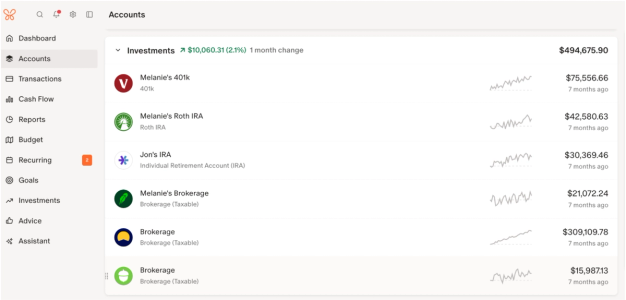
Seeing all your 401(k) accounts in one place lets you track your progress and avoid forgetting old accounts between job switches. Monarch links all your 401(k) accounts so you can see them all in one place, keeping you updated in real time.

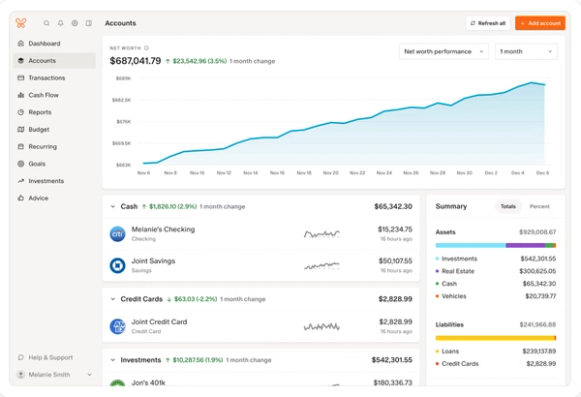
As your 401(k) and retirement accounts grow, so does your net worth. You can track your net worth changes with Monarch’s net worth tracker, even through job transitions and career changes.

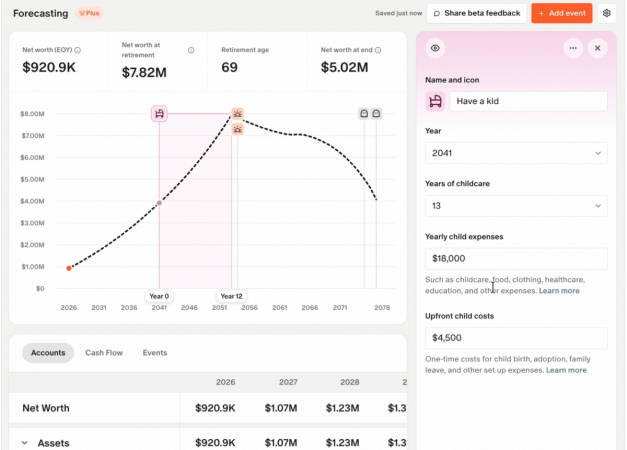
Knowing how an employment gap can impact your retirement timeline is key to planning out your savings trajectory. Monarch Plus users get access to forecasting, which helps you map out how different scenarios, like a change in income, can change your savings plan.

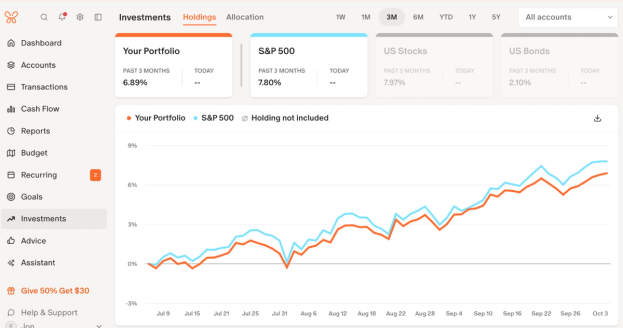
Tracking the growth of multiple investments doesn’t have to involve multiple login screens or a complicated spreadsheet. Monarch pulls your investments onto one page so you can track growth, equity vesting, and your RSU schedule alongside your retirement accounts, so you know exactly when to transfer your balance for maximum gain.

Ready to make your job transition a successful one? Start your free trial at monarch.com today.
Take the next step without the guesswork
Changing your job comes with a few core options for managing your retirement funds and finances, which can have consequences for your retirement timelines depending on which choice you make. While cashing out might be tempting, you’ll be better off avoiding taxes and penalties by rolling over your balance or keeping it in an account that will allow your funds to grow over time.
No matter what you choose, Monarch offers you every financial tool you need to navigate your transition in one place. Whether it’s keeping track of old accounts, helping you plan out your retirement timeline, or watching your nest egg grow, Monarch can help you make your job change a smooth one.
FAQs
Can my employer take back my 401(k) if I quit?
No, the money is yours to keep. However, unvested balances will be lost if you choose to move the funds before vesting takes place.
How long do I have to roll over?
While there’s no strict limit on rolling over your funds, if you choose an indirect rollover (which is when you have the old provider cut you a check with the intent of depositing it in a new account), you have 60 days to deposit the funds or else risk getting hit with an early withdrawal penalty.
What is the Rule of 55?
If you leave your employer in or after the calendar year you turn 55, you can cash out that employer’s 401(k) without the early withdrawal penalty.
Can I roll over if I have a 401(k) loan?
You can, but if you choose to use part of your 401(k) balance to pay off the loan, it’s considered taxable income and is subject to the early withdrawal penalty. Alternatively, you can pay down the loan balance from your own money, which allows you to avoid the penalty and taxes.
How do I find an old 401(k)?
There are three main options. Firstly, use the Department of Labor’s Retirement Savings Lost and Found Database. If that doesn’t work, try your state’s unclaimed property/funds website. Finally, try reaching out to your former employer’s HR department, which may be able to find your old 401(k) provider files based on your period of employment.