Picking the right way to budget makes sticking to your spending limits, managing your cash flow, and maintaining good financial habits much easier.
Less than one-third (29%) of Americans reviewed their budget in the previous month, according to a Bankrate survey. The other 71% aren’t lazy or undisciplined. Many simply aren’t using the right tools for them and their lifestyle, leaving them stuck in a loop of failed budgeting and missed financial goals.
Of the budgeting tools available, three major ones dominate the field: spreadsheets, apps, and the cash envelope method. Here, we deep dive into the pros and cons, how to determine which tools and methods are best for you, and how to use each tool to your advantage.
Why choosing the right budget tool matters
Budgeting isn’t just about discipline. It’s about finding the right style and tools to help you manage your spending, encourage saving, and build an overall financial plan for your life.
According to the Federal Reserve’s Economic Well-Being of U.S. Households in 2025 report, less than half (41%) of American adults said they spent less than they had made in the month. According to a Bankrate survey, 43% of Americans reported that money negatively impacted their mental health.
With the right budgeting tool, budgeting doesn’t become a slog or something that fills you with dread. Instead, it helps you achieve your financial goals and feel in charge of your money.
The right budgeting tool can amplify your motivation and reasons to budget. If you’re looking to pay off debt and rein in your spending, the cash envelope method can give you the right guardrails to get started.
If you’re all about customization and making your budget perfect to the last data point, the spreadsheet method might be for you. If you’re looking for a balance of ease of access, automatic tracking, and data-driven insights on your spending, then using a budgeting app is the way to go.
Spreadsheets — total control, total manual effort
Spreadsheets give you full control and privacy over your budget but require more manual input.
Spreadsheets are one of the most basic ways of creating and managing a budget, offering total customization and control of your data at the cost of requiring more time and manual input. You can make a spreadsheet budget as simple or as complex as you want and need it to be, depending on how comfortable you are with spreadsheet formulas.
One of the core perks of using spreadsheets is that you own your data and your budget template outright. You can customize it any way you please, and you don’t have to worry about the risk of data leaks or your data being sold to advertisers.
Spreadsheets won't get shut down the way apps sometimes do, and can offer a more robust way to track assets, net worth, and long-term financial goals than using a cash envelope system.
On the downside, spreadsheets require a lot of manual input. You’ll have to record your spending on the sheet on a regular basis, and there’s no automatic tracking, alerts, or limits to help you manage your spending or keep an eye on your limits. It’s also less mobile, as most spreadsheets are best operated on a computer or tablet instead of a mobile phone.
Manual tracking can also lead to burnout, which often shows up as skipped weeks or losing the habit altogether
If you’re starting from scratch, there are a few templates you can use. Google Sheets, Excel, and Vertex42 all offer budgeting templates with the formulas already implemented, with many more available online for free. Some apps like Tiller automatically track your expenses and input them into a spreadsheet, offering the best of both worlds.
Pros:
- Complete control over your data
- Total customization available
- Easy to combine with other tools like budgeting apps
Cons:
- Requires heavy manual input
- High weekly and monthly time investment
- Can be intimidating or difficult to follow for beginners
When to use it:
- You want to keep your data 'offline' or ensure privacy
- You want more customization or unique options than budgeting apps offer
- You want to use data from a budgeting app to create a “backup” or central budget
Budgeting apps — automation at the cost of flexibility
Budgeting apps offer a quicker, more automatic way to budget, though they’re less private and customizable than DIY methods.
Budgeting apps help you budget automatically and from anywhere, allowing you to link your spending and saving accounts so it tracks your transactions in one place. From there, you can build a budget and create limits on your spending, allowing you to budget and track your money without the need for manual input.
Budgeting apps offer different levels of complexity with different price points to match. Some apps offer purely budget-based services focused on having you allocate and categorize your expenses and savings. Others offer more services such as debt repayment tracking, forecasting, investment management, and financial planning.
Budgeting apps come in several styles.
Zero-based budgeting apps format their style around having you track and allocate every dollar of your income, be it for saving or spending.
Simple budgeting apps offer basic budgeting tools to help you get started at a relatively lower price.
Envelope style budgeting apps are formatted around the cash envelope budgeting style, where you assign funds to spending categories that can be moved or reallocated as needed.
Flex budgeting apps like Monarch revolve around managing your expenses in a flexible way, allocating essential and fixed funds first before allocating the remainder for discretionary and non-fixed expenses.
Many apps offer a temporary free trial at the beginning, so you can shop around and see which one fits your style best.
One of the core advantages of budgeting apps is the automation. Besides automating your transaction inputs, cash flow calculations, and other nitty-gritty details, a budgeting app can help automate your savings by allocating your income ahead of time.
Instead of saving “whatever’s left over” at the end of the month (a technique that 21% of Americans use, according to NerdWallet), a budgeting app can help you make your savings an intentional part of your financial plan.
One downside of using a budgeting app is the risk of the platform shutting down, as was the case with Mint in 2024. While users had time to save their data and transfer it to another platform, many users had to re-create their budgets from scratch on other platforms.
The other risk comes with how much you customize your budget. Apps fail when their default categories don't match how you actually spend, and you bail before customizing them. Taking some time to customize your categories and tweak your budget to your liking will go a long way to help you stay on track.
Pros:
- Automates transactions for low time input
- Often beginner-friendly
- Can offer insights on saving, spending, debt repayment, and other data points at a glance
Cons:
- Subscription fees apply
- May sell data to advertisers (if free)
- Can be discontinued by the publisher
When to use it:
- You want a data-driven way to track expenses without the need for manual input
- You have multiple accounts to keep track of
- You want insights on net worth, investments, and asset growth
The cash envelope system — the original "app"
The cash envelope system, popularized by financial influencer Dave Ramsey, puts hard caps on your spending by limiting your budget to physical money you allocate ahead of time.
The cash envelope system is a relatively low-tech but effective way to budget, especially if you’re just starting out. The premise is simple:
- Choose your spending categories, or envelopes.
- Determine how much you want to allocate to each one, and put the appropriate amount of cash in each envelope. Some users of this method will either set aside savings in their own envelope, or keep their monthly savings in a separate account and not withdraw it as cash
- Spend down the cash in the envelope, stopping when you run out.
- Move funds from envelope to envelope as needed.
- If you have cash left over in any envelopes at the end of the month, it can be put into savings, used for discretionary expenses, moved into other envelopes, or simply left in the envelope to roll over into the next month’s allocation.
The key advantage of the cash envelope method is its simplicity. The cash represents a hard limit to your spending – once you’re out, you’re out. This allows you to ensure you have enough money for your priorities, such as your housing costs, debt repayments, and utilities, and that you don’t run the risk of overspending with your discretionary expenses.
The method adapts to a digital world: most recurring bills and subscriptions don't use cash anyway, which is where the strict version of the system falls down. To reconcile this, you can use apps that are centered around the cash envelope method, providing “digital envelopes” that operate the same way as physical ones.
Some users use sub-accounts as their envelopes, with one bank account serving as their “envelope” for essential expenses, while another serves as the envelope for discretionary expenses, and so on. Other financial platforms like Monarch can also be configured to have category caps and rollover funds that act like a cash envelope system.
When to use it:
- You want hard limits on your spending
- You want to prioritize savings and debt repayment
- You’re a beginner looking for a simple, low-cost budgeting method
Budgeting tools: A side-by-side comparison
Here’s a quick breakdown of how the top three most common budgeting tools compare to one another.
Spreadsheets | Budgeting apps | Cash envelope | |
Time investment | High time investment at the beginning, and then 30+ minutes per week to apply transactions and review | Requires some at the beginning then low month-to-month, usually less than 30 minutes | Requires some maintenance month to month to budget and refill envelopes, usually 1 hour |
Cost per year | Free | Ranges from free to $150 a year | Free |
Ease of entry | Requires knowledge of spreadsheet formulas, budget templates, and financial equations | Relatively easy entry, with apps offering guides, templates, and tutorials | Requires some planning and budgeting out beforehand |
Customization level | Highly custom in terms of categories, allocations, accounting methods and budgeting style | Can customize within the app, but can be less granular | Highly customizable for individual categories, but the budgeting style is concrete |
Multi-account support | Can be used for an entire household, though users need some know-how | Depends on app, but often supported | Can be used for an entire household |
Debt repayment | Can track debt payments, but requires manual setup and input | Offers visualizations for debt repayment tracking and progress | Can help you make repayments a priority, though tracking requires separate tools |
Impulse spending limits | Depends on budgeting style, but generally requires self-governing | Can set alerts and notifications for overspending, but generally self-governing | Hard limits — when the cash is gone, spending stops |
Long-term sustainability | Can be managed, but requires constant maintenance and input | Low long-term maintenance, so long as the app stays live | Can be sustained long term with regular maintenance and habitual management |
The hybrid approach — what disciplined budgeters actually do
There’s no rule saying that you have to stick to one budgeting tool exclusively. In fact, combining multiple budgeting tools can offer you the best of all worlds.
For example, you can use the cash envelope method, either with physical cash or category limits on a budgeting app, for the categories you tend to overspend on, while using an app for the rest of your expenses.
For example, in Monarch you can use a flex budget and still set hard category caps on the things you tend to overspend on.
Many users choose to combine using an app with a spreadsheet, plugging in their transaction totals, category expenditures, and month-to-month balances from the app into their own personal sheet, allowing them to keep track of their finances long-term and between accounts.
Which method is right for you?
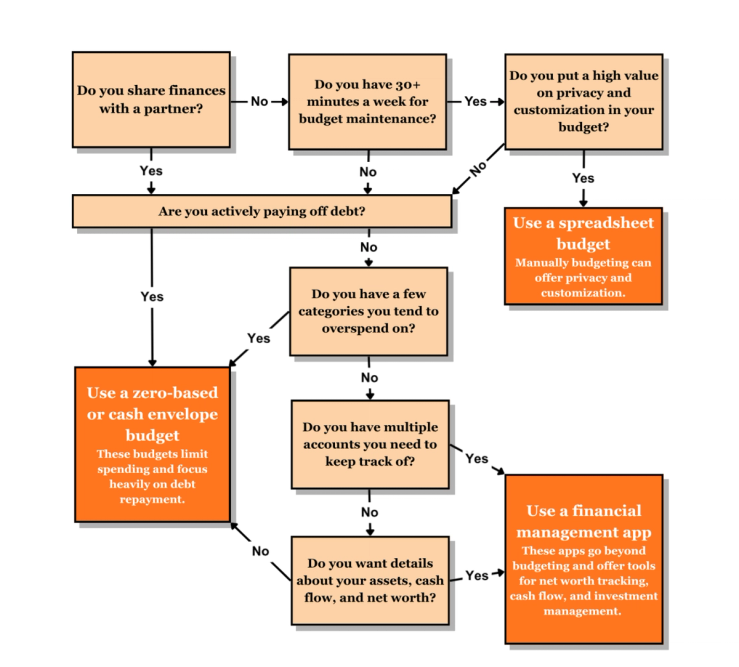
Trying to figure out the right budgeting tool for you? Here are a few questions to ask yourself to figure out which one to use.

How Monarch helps with each method
Monarch offers the tools and platform to help you build a budget and financial plan that works for you and your family, and to find the budgeting approach that fits how you actually live.
Tired of spreadsheets? Monarch’s Flex budget simplifies your spending and saving by dividing your budget into three buckets: fixed expenses, non-monthly expenses, and flex expenses. This way, you can prioritize your essentials (like rent and insurance), make plans for non-monthly purchases, and have flexibility in how you spend the remainder – without juggling multiple categories or limits.

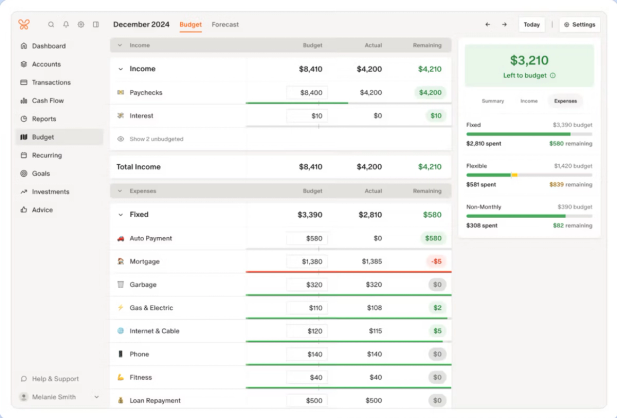
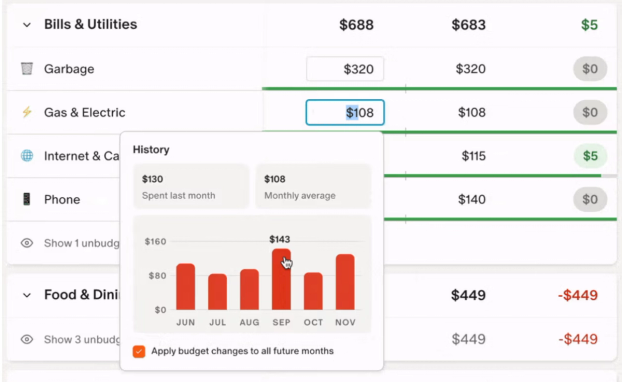
For cash envelope users, Monarch has you covered with a category budget. "Here, you split your income across digital “envelopes” with options for custom categories and limits based on historical spending data. If you’re using a zero-based budget, Monarch helps you make sure every dollar of your income is allocated with tools like the cash flow dashboard.

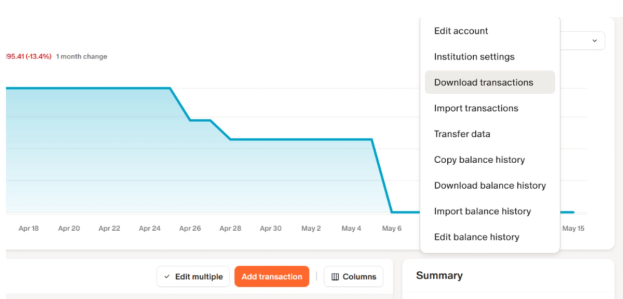
If you prefer spreadsheets, Monarch lets you export your transactions as CSV for one or all of your accounts.

Finally, if you’re budgeting as a couple or a household, Monarch simplifies managing multiple accounts by allowing you to create a household budget for multiple accounts. You can add multiple bank and card accounts, filter by transactions, and create shared goals you can both contribute to. You can add an unlimited number of accounts to your household for free, all with access to Monarch’s budgeting and financial planning tools.
The best budgeting tool is the one you'll actually use
While budgeting tools can take you a long way, simply downloading an app, starting a new spreadsheet, or stuffing cash into envelopes isn’t a magic recipe for financial discipline. Instead, the right tool amplifies the discipline and motivation you already have and enables you to get the most out of how you plan out your spending and saving. Whether you use one tool alone or combine them, finding the right tool for your lifestyle and financial habits can help you build (and stick to) a financial plan for the long run.
FAQs
Are budgeting apps better than spreadsheets?
That depends on your priorities. Budgeting apps offer more automation in tracking your transactions, giving you a more up-to-date version of your budget and offering more mobile options. You also don’t have to invest as much time in it as you would a spreadsheet.
On the other hand, spreadsheets can offer more privacy and security around your data, and often cost less than a budgeting app subscription. In the end, a budgeting app is better than a spreadsheet if it helps you stick with the habit of budgeting, adhere to your limits, and achieve your goals.
Does the cash envelope system still work without cash?
It can, if you use a cash envelope-based budgeting app, or if you use digital ways to put limits on your cash. For example, some users will keep their different “envelopes” in separate bank accounts, so the physical spending limit is still present. You can configure other budgeting apps to have hard limits on your “envelopes” with rollover options for your leftover funds.
Which budgeting method is best for paying off debt?
A strict budgeting method, like a zero-based budget or the cash envelope method, can be helpful, as it puts a high emphasis on limiting spending and prioritizing savings/debt repayments. However, if you want more flexibility with your budgeting, a flex budget helps you put aside money for your debt repayments first and foremost while giving you more freedom with your discretionary spending.
What's the best budgeting tool for couples?
Budgeting apps are a good way to manage multiple accounts, encourage transparency in spending, and track the progress of your shared goals. Both spreadsheets and the cash envelope method can be used by couples, but tracking spending and staying accountable is harder without automated transaction tracking. As well, a budgeting app can be the basis for holding regular “money dates” that keep you and your partner on the same page about your money.
How do I switch from a spreadsheet to a budgeting app?
First, choose an app that works with your budgeting style. Then link your accounts and cards to the app so it can start tracking your transactions. Depending on the app, you can upload your spreadsheet as a CSV file (which most spreadsheet programs can export easily).